
In this blog lets see the steps - How to create Agent AI in Google AI(Vertex AI).
What is AI Agent?
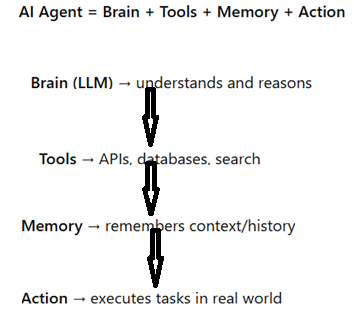
AI Agent is software program that can
- Understand instructions (natural language input).
- Think based on context (logic, goals, memory).
- Act by using tools, APIs, or taking actions in the real world.
Learn from interactions and feedback.
Before going into Steps , we will see how AI Agent differed from AI Chatbot.
Chatbot
- You: “Book me a flight to Chennai tomorrow evening.”
Chatbot: “Flights to Chennai are available.” That’s it. It just answers, but doesn’t act. AI Agent
- You: “Book me a flight to Chennai tomorrow evening.”
AI Agent will: - Understand your request (intent: book a flight).
- Check tools/APIs – connect to flight booking service.
- Search flights tomorrow evening.
- Decide & Act – select best flight (time/price).
- Book ticket on your behalf.
Reply back:
“Your Chennai flight is booked tomorrow at 7:45 PM. Ticket sent to your email.”
Difference:
Chatbot = Q&A only.
AI Agent = Q&A + Action execution.
Lets have look into diagramatic representatio:
Why GCP/Vertex AI?
Rapidly evolving landscape of cloud computing and artificial intelligence, Google Cloud Platform (GCP), its unified AI platform Vertex AI, and the Agent Development Kit (ADK) offer a powerful triad for building and deploying sophisticated AI applications. Together, they provide a comprehensive, scalable, and developer-friendly ecosystem that accelerates the entire machine learning lifecycle, from data preparation to agentic AI development.
Vertex AI
Built on top of GCP's powerful infrastructure, Vertex AI is a managed machine learning platform that streamlines the process of building, deploying, and managing ML models. Its primary advantages lie in its unified and collaborative nature:
- End-to-End MLOps: Vertex AI provides a single platform for the entire machine learning lifecycle, from data preparation and feature engineering with Vertex AI Feature Store to model training, evaluation, and deployment. This unified approach, often referred to as MLOps, fosters collaboration between data scientists, ML engineers, and developers, accelerating the path to production.
- Accessibility for All Skill Levels: The platform caters to a wide range of users. AutoML enables developers with limited machine learning expertise to train high-quality custom models, while seasoned data scientists can leverage custom training options with popular frameworks like TensorFlow, PyTorch, and scikit-learn for greater control and flexibility.
- Powerful Pre-trained Models and APIs: Vertex AI offers access to a vast collection of Google's state-of-the-art pre-trained models for vision, language, and structured data. These models, including the powerful Gemini family, can be easily integrated into applications via APIs, allowing developers to add sophisticated AI capabilities with minimal effort.
- Managed Services for Efficiency: By managing the underlying infrastructure, Vertex AI frees up teams to focus on building and refining their models rather than on operational overhead. This includes services for distributed training, hyperparameter tuning, and scalable model serving
Agent Development Kit (ADK): Building Intelligent AI Agents
The Agent Development Kit (ADK) is an open-source framework designed to simplify the development of AI agents on Vertex AI. These agents are sophisticated applications that can understand natural language, reason, and take actions to accomplish tasks.
The key benefits of using ADK include:
- Simplified Agent Creation: ADK provides a structured and declarative approach to building AI agents. This allows developers to define the agent's goals, tools, and instructions in a straightforward manner, significantly reducing the amount of boilerplate code required.
- Seamless Integration with Tools and APIs: A core feature of ADK is its ability to easily integrate with various tools and APIs. This enables agents to interact with external systems, access proprietary data, and perform a wide range of actions, making them highly capable and versatile. For example, an agent could be equipped with tools to search a product database, book appointments, or analyze customer data.
- Local Development and Testing: ADK includes a web-based development console that allows for local testing and debugging of agents. This iterative development process enables developers to quickly refine agent behavior and ensure it performs as expected before deploying to a production environment.
Deployment to Vertex AI: Once an agent is developed and tested, ADK facilitates its deployment to Vertex AI. This allows the agent to leverage the scalability, reliability, and security of Google's infrastructure, making it ready for real-world application.
Let see the steps
| Step | Description | Key Commands / Code / Notes |
|---|---|---|
| 1. Setup GCP Project & Enable APIs | Create a GCP project (or use existing), enable billing, enable required APIs (Vertex AI, Generative AI, Agent APIs) Google Cloud+2Medium+2 | gcloud services enable aiplatform.googleapis.com generativelanguage.googleapis.com agent.googleapis.com etc Medium+1 |
| 2. Install / set up local environment | On local machine (or Cloud Shell), setup Python, virtual environment, GCP SDK, ADK (Agent Development Kit) Google Cloud+2Medium+2 | pip install google-adk or related libraries. Also set environment variables: GOOGLE_CLOUD_PROJECT, GOOGLE_CLOUD_LOCATION etc Medium+2Google Cloud+2 |
| 3. Define / build the Agent | Create an agent instance, define its “instruction” or “instruction set” (i.e. what it should do), optionally attach tools (e.g. call external APIs, database, search) |
|
4. Add Tools / Grounding / Memory - To make the agent meaningful, attach “tools” like search, database access, function calls, retrieval from knowledge base (RAG), memory modules etc E.g. `agent.add_tool(...)` or configure a knowledge base or datastore
5. Test Locally (Development) - Use the ADK’s local interface or simulator to chat with the agent, iterate prompt, test behavior, refine instruction / tools
6. Deploy to Production / Agent Engine - Deploy your agent to Vertex AI’s managed runtime (Agent Engine), which handles scaling, monitoring, endpoints etc Use methods/SDK or console to deploy; for example `agent.deploy()` in SDK or via Vertex console .
7. Integrate / Embed / Expose Expose the agent via a chat widget, API, embed in your website or mobile app, connect to front-end UI . Use generated snippet or REST endpoint, embed in web page, call agent via client SDK etc
8. Monitor & Improve (Feedback Loop)- Use logs, metrics, evaluations; monitor latency, accuracy, cost; gather real user feedback and retrain or adjust tools/instructions .Use Cloud Logging, Cloud Trace, evaluation tools, deploy updates periodically
Tips & Additional Considerations
- Use Agent Builder / Agent Garden in GCP to explore sample agents and templates, which helps you bootstrap.
- Agent Development Kit (ADK) is currently in preview; use it to develop multi-agent systems with better control.
- Model choice matters: For example, “gemini-2.5-flash” is a fast model option.
- Security, IAM & Permissions: Make sure your service accounts and IAM roles are set properly so the agent can call APIs / access data without permission errors.
- Cost management: Deploying generative AI agents (especially in production) can incur costs. Use logging, quotas, and clean up unused resources.
- Grounding & context matter a lot: Without proper knowledge/data attachment, your agent will hallucinate.
- Iterative approach: Start with a simple agent (no tools) then gradually add tools, memory, datastore.
- User testing: Use a small beta before full public rollout.